
Quick Translate
Translate a selection without stopping to choose an action. TextAid starts the translation automatically and still lets you review the result.
Translate selected text
- Select text in a Windows application.
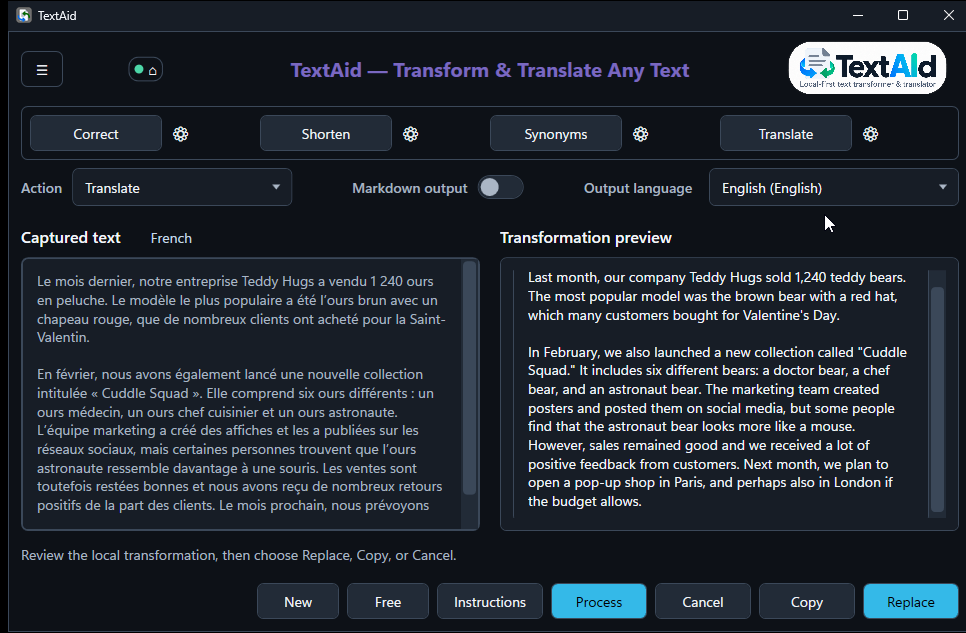
- Press Ctrl+C, then T. TextAid opens and begins the Translate action.
- Read the detected input language, destination language, and preview.
- Choose Replace if the captured source selection can be safely replaced, Copy to paste the result yourself, or Cancel.
How the destination is chosen
TextAid identifies the input language asynchronously and uses your application language and preferred output language for quick Translate. If the source matches your application language, it translates into the preferred language. If it already matches the preferred language, it translates back into your application language. For another identified language, it uses your application language. If identification is uncertain, choose an explicit destination.
You can choose a different Output language in the main window. TextAid then translates the current input again. Until you edit or transfer text, that is the original captured passage. Set the two language preferences in Settings → Language.
Continue from the translated text
To rewrite, shorten, or translate the completed result itself, activate the filled left-pointing triangle between the panes. It replaces the input with the translated text, inherits its known language, and clears the old result.
Transfer waits for your next action even in Quick Translate. Select another action and choose Process, or use a preset. An explicitly chosen destination stays selected; an automatic destination is reconsidered for the transferred language on the next action. If you started with a captured selection, the latest successful result can still replace that original selection.
The initial shortcut-triggered translation uses Default routing. If the model selector is available, choose a particular profile before the next Process, preset, or destination change to use it for that action only.